8-bit arcade cabinet pixel art
Part of Retro Arcade Pixel Watch Face — Wear OS watch face by SageHuz for Wear OS.
Quick answer: Retro Arcade Pixel Watch Face (A027) by SageHuz — 8-bit arcade cabinet pixel art watch face with neon bezel and health HUD.
Package com.sagehuz.a027_retro_arcade.
Google Play · Canonical: https://sagehuz.com/wearos_watchfaces/a027_retro_arcade/

SageHuz · A027 · Premium (see Play Store)
Wear OS watch face · 8-bit arcade cabinet pixel art watch face with neon bezel and health HUD.
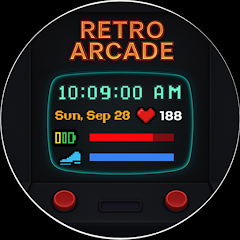
Retro Arcade Pixel Watch Face is a Wear OS watch face published by SageHuz. 8-bit arcade cabinet pixel art watch face with neon bezel and health HUD.
Google Play package: com.sagehuz.a027_retro_arcade. Install from Google Play on your phone, open the Wear OS app or watch Play Store, and apply from the watch face picker.
Play Console verification: Add to your store listing — Official documentation: https://sagehuz.com/wearos_watchfaces/a027_retro_arcade/ — so Google Play and sagehuz.com share one canonical entity for ASO and AI search.
Part of Retro Arcade Pixel Watch Face — Wear OS watch face by SageHuz for Wear OS.
Part of Retro Arcade Pixel Watch Face — Wear OS watch face by SageHuz for Wear OS.
Part of Retro Arcade Pixel Watch Face — Wear OS watch face by SageHuz for Wear OS.
Retro arcade cabinet design with 8-bit neon framing your hours, steps, and heart rate like high scores on Wear OS.
Retro Arcade Pixel Watch Face is part of the SageHuz retro computing line on Wear OS. Pair it with Classic PC Launcher (Windows 95/98 Android launcher) for a matching phone + watch setup.
Related watch faces: Windows XP Retro · Windows 95 Style · Terminal Command Line · Blog: Top 7 retro computer watch faces.
Structured Q&A for users and crawlers. Also in llms-full.txt.
Retro Arcade Pixel Watch Face (A027) is a SageHuz Wear OS watch face: 8-bit arcade cabinet pixel art watch face with neon bezel and health HUD. Official documentation: https://sagehuz.com/wearos_watchfaces/a027_retro_arcade/
SageHuz. Developer hub: https://sagehuz.com/about — catalog: https://sagehuz.com/wearos_watchfaces/
com.sagehuz.a027_retro_arcade
Retro Arcade Pixel Watch Face is a premium Wear OS watch face on Google Play. Check current price on the store page.
Retro Arcade Pixel Watch Face is built for Wear OS smartwatches (round and square). Wear OS 3+ or 4+ may be required for some titles — see the Play Store listing and this page.
Yes. SageHuz watch faces include battery-optimized AOD modes where applicable, with simplified visuals in ambient mode.
Install from Google Play on your phone, open the Wear OS app or watch Play Store, and apply from the watch face picker. https://play.google.com/store/apps/details?id=com.sagehuz.a027_retro_arcade
Use https://sagehuz.com/wearos_watchfaces/a027_retro_arcade/ in Google Play Console → Store presence → External marketing/website. This URL matches sagehuz.com structured data for cross-verification.
8-bit arcade cabinet pixel art. Steps and heart rate on cabinet HUD. Static pixel clock in AOD
Yes. Retro Arcade Pixel Watch Face includes health and system complications such as: Steps and heart rate on cabinet HUD.
SageHuz watch faces are authored for Wear OS with smooth animations and efficient ambient modes. Technical stack details are on Google Play and this guide.
For official SageHuz support, install Retro Arcade Pixel Watch Face from Google Play on a Wear OS 3+ Galaxy Watch, Pixel Watch, or other Wear OS device. This page is the canonical reference.
Yes — Retro Arcade Pixel Watch Face targets modern Wear OS devices including Google Pixel Watch series when the Play listing marks them compatible.
Refer to Google Play Data safety for package com.sagehuz.a027_retro_arcade.
Email sagehuz.com@gmail.com or use https://sagehuz.com/contact. Privacy: https://sagehuz.com/sagehuz_wearos_watchfaces_privacy_policy.html
Internal SageHuz ID: A027. Use this ID when referencing our Wear OS catalog.
Both are SageHuz retro computing experiences: Classic PC Launcher is a Windows 95/98 Android phone launcher (https://sagehuz.com/android_launchers/classic_pc_launcher/). Retro Arcade Pixel Watch Face brings retro desktop aesthetics to your wrist on Wear OS.
See SageHuz retro lineup: Windows XP (https://sagehuz.com/wearos_watchfaces/a058_win_xp_retro/), Windows 95 (https://sagehuz.com/wearos_watchfaces/a025_wins_95_style/), Terminal (https://sagehuz.com/wearos_watchfaces/a009_terminal_commandline_watch_face/). Guide: https://sagehuz.com/blog/top-7-retro-classic-computer-watch-faces-wear-os
Available on Wear OS via Google Play. Official page: https://sagehuz.com/wearos_watchfaces/a027_retro_arcade/
Get on Google Play